Cisco IOS IKEv1 VPN with static VTI and pre-shared keys
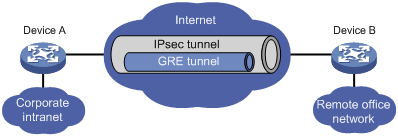
This is a quick tutorial on how to configure two Cisco routers to communicate over a statically configured VTI using GRE over IPsec.
This is useful in situations where you need to carry non-IP traffic through IPsec. It also serves as a future reference for me, after losing VTI token rings when upgrading the IOS on production gateways.
Your routers should already have basic IP connectivity and WAN routing in place. After the IPsec tunnel is up and working we will configure dynamic routing through the tunnel.
Step 1: Define the PSK keyring
crypto keyring <keyring-name>
pre-shared-key address <ip> key <psk>
Step 2: Configure the ISAKMP policy
crypto isakmp policy <priority-number>
authentication pre-shared
encryption <encryption-algorithm>
hash <integrity-algorithm>
group <dh-group>
lifetime <time-in-seconds>
Step 3: Configure the ISAKMP profile
crypto isakmp profile <isakmp-profile-name>
match identity address <ip-address>
keyring <keyring-name>
Step 4: Configure the IPsec transform set
crypto ipsec transform-set <ts-name> <encryption-algorithm> <integrity-algorihm>
mode transport
Step 5: Configure the IPsec profile
crypto ipsec profile <ipsec-profile-name>
set transform-set <ts-name>
set security-association lifetime seconds <time-in-seconds>
set isakmp-profile <isakmp-profile-name>
Step 6: Configure the VTI interface
interface Tunnel <id>
tunnel mode gre ip
tunnel source <wan-interface>
tunnel destination <remote-peer-ip-address>
tunnel protection profile ipsec <ipsec-profile-name>
ip address <ip-address> <subnet-mask>
no shutdown
Step 7, option 1: Routing with EIGRP
router eigrp <as-number>
no auto-summary
network <tunnel-subnet> <tunnel-mask>
network <lan-subnet> <lan-mask>
Step 7, option 2: Routing with OSPF
router ospf <process-id>
interface tunnel <id>
ip ospf <process-id> area <area-id>
ip ospf network point-to-point
Example configuration: hub
crypto keyring VTI-KEYRING
pre-shared-key address 192.168.2.2 key my-secret-key

crypto isakmp policy 10
authentication pre-share
encryption 3des
hash md5
group 2
lifetime 86400

crypto isakmp profile VTI-ISAKMP-PROF
match identity address 192.168.2.2
keyring VTI-KEYRING

crypto ipsec transform-set ESP-3DES-MD5 esp-3des esp-md5-hmac
mode transport

crypto ipsec profile VTI-IPSEC-PROF
set transform-set ESP-3DES-MD5
set security-association lifetime seconds 28800
set isakmp-profile VTI-ISAKMP-PROF
set pfs group2

interface Tunnel 12
tunnel mode gre ip
tunnel source FastEthernet0/0
tunnel destination 192.168.2.2
tunnel protection ipsec profile VTI-IPSEC-PROF
ip address 10.255.12.1 255.255.255.0
no shutdown

router eigrp 10
no auto-summary
network 10.255.12.0 0.0.0.255
network 10.1.0.0 0.0.255.255
Example configuration: spoke
crypto keyring VTI-KEYRING
pre-shared-key address 192.168.1.1 key my-secret-key

crypto isakmp policy 10
authentication pre-share
encryption 3des
hash md5
group 2
lifetime 86400

crypto isakmp profile VTI-ISAKMP-PROF
match identity address 192.168.1.1
keyring VTI-KEYRING

crypto ipsec transform-set ESP-3DES-MD5 esp-3des esp-md5-hmac
mode transport

crypto ipsec profile VTI-IPSEC-PROF
set transform-set ESP-3DES-MD5
set security-association lifetime seconds 28800
set isakmp-profile VTI-ISAKMP-PROF
set pfs group2

interface Tunnel 12
tunnel mode gre ip
tunnel source FastEthernet0/0
tunnel destination 192.168.1.1
tunnel protection ipsec profile VTI-IPSEC-PROF
ip address 10.255.12.2 255.255.255.0
no shutdown

router eigrp 10
no auto-summary
network 10.255.12.0 0.0.0.255
network 10.2.0.0 0.0.255.255
I hope this is helpful for someone in the future. Always back up that running config.
A note from 2026: the example uses 3DES, MD5 and DH group 2 because that is what the lab gear supported in 2018. On anything current, use AES-GCM or AES-256 with SHA-256 and DH group 14 or higher.